Shopify app and customization workflow platform

Custom products made simple on Shopify.

Guide shoppers through product, design, sizes, and order in a clean flow while keeping the merchant side ready for production.

  • Frontend that feels structured and easy to use
  • Merchant controls for AI styles, colors, and options
  • Built for print-ready workflows after checkout
Live storefront designer
Design tools on mobile

Trusted workflow

Designed around the real Shirtaki storefront flow

The site now follows the real Shirtaki UX: clearer steps, calmer layout, compact copy, and real screenshots from the live product.

What the site needs to communicate fast

  • Product, design, sizes, and order as a clear customer journey
  • Desktop and mobile flows that already exist live
  • Merchant settings shown as a practical admin workspace

4 steps

See the real product flow

Follow the customer journey and the merchant workflow step by step, with each screenshot tied to a concrete part of the product.

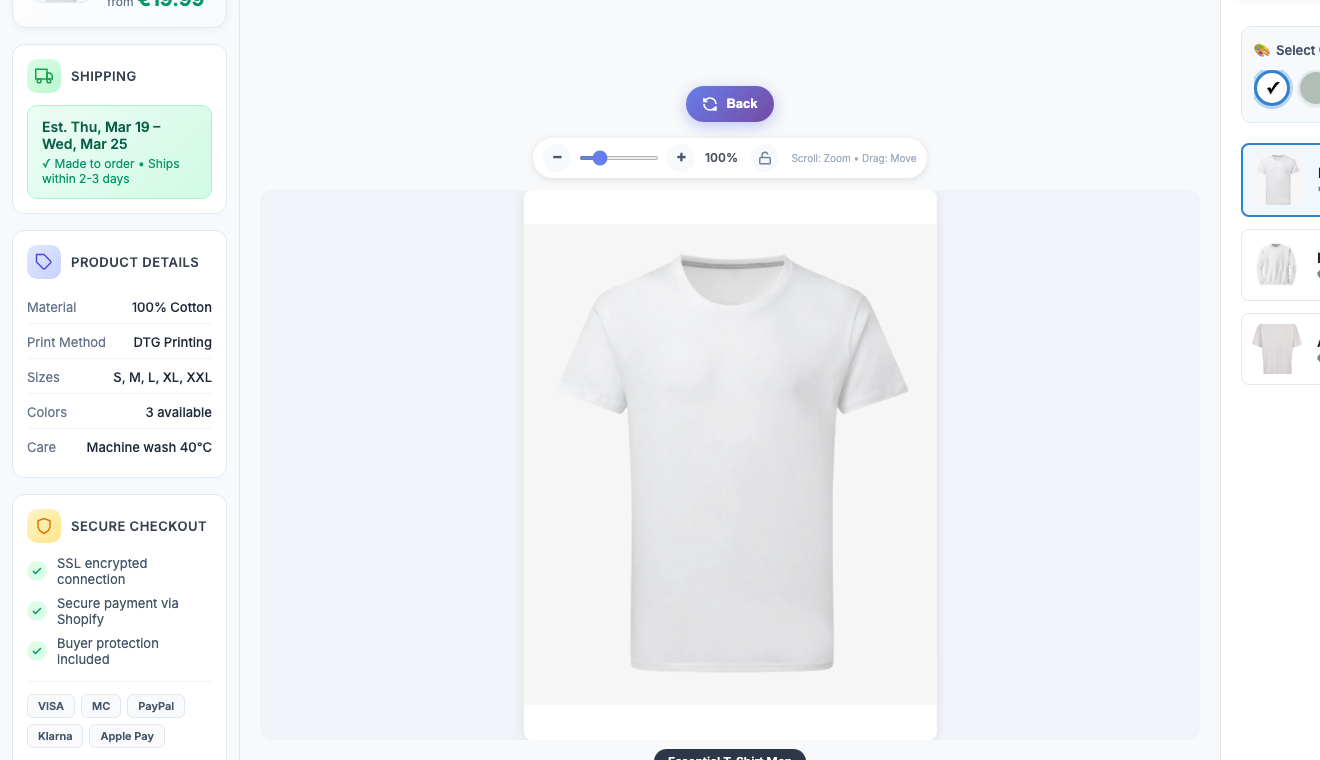
Product setup and live product selection
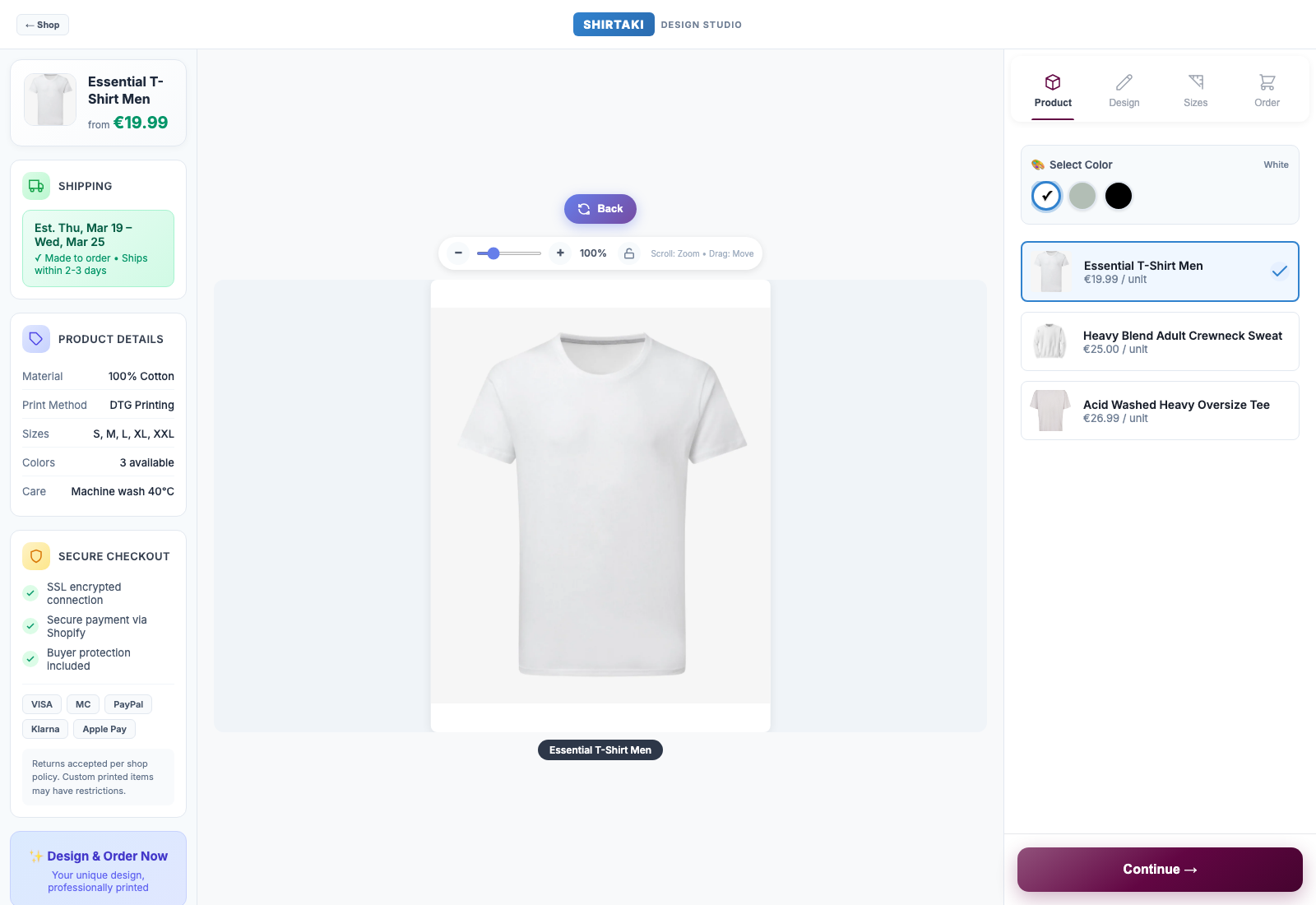
Step 1 Desktop view

Product setup and live product selection

This is the entry view on the storefront. It keeps product choice, color selection, pricing context, and the next step visible without overwhelming the shopper.

Live product switchColor optionsStock-linked setup
  • The merchant connects an existing Shopify product instead of rebuilding the catalog in a separate system
  • The storefront shows product choices, color selection, and active item details in a clear product-first layout
  • Live stock, product data, and product switching stay tied to the Shopify setup behind the designer
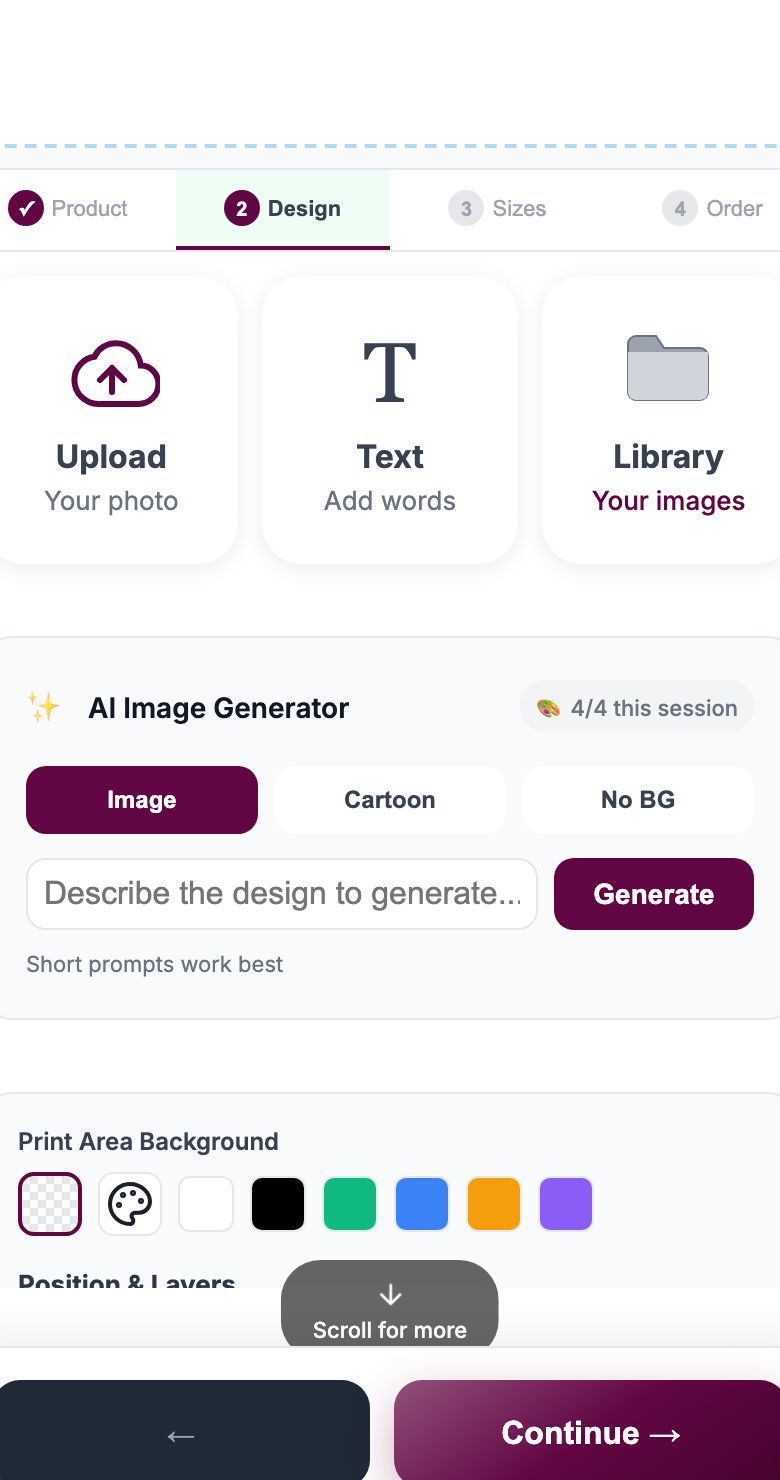
Upload, text, AI image styles, crop logic, and design controls
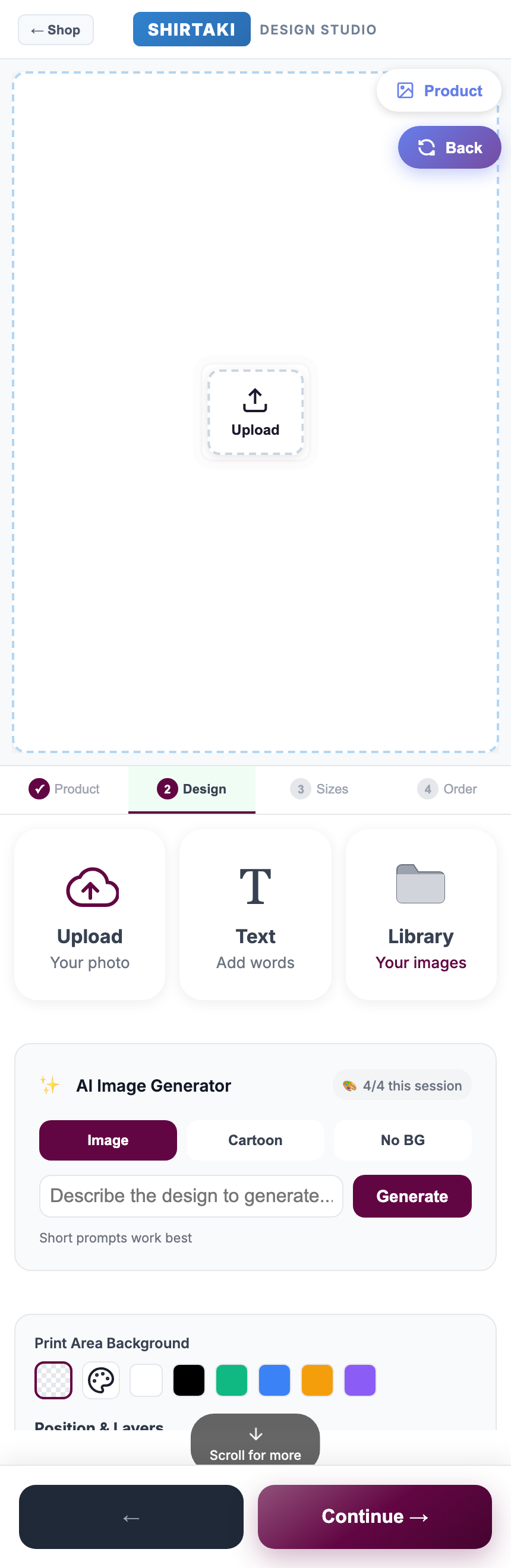
Step 2 Design step

Upload, text, AI image styles, crop logic, and design controls

This screen is where personalization actually happens. Upload, text, AI actions, and positioning tools are grouped into one focused workspace instead of being spread across multiple panels.

UploadTextAI stylesNo BGLayers
  • Customers can upload an image, work with their own library items, or add custom text from the design step
  • AI image generation, style actions, background removal, crop handling, zoom behavior, and layer positioning stay inside one guided screen
  • This keeps design choices visible and simple on mobile instead of scattering tools across a cluttered editor
Mobile-friendly size, quantity, discount, and upsell flow
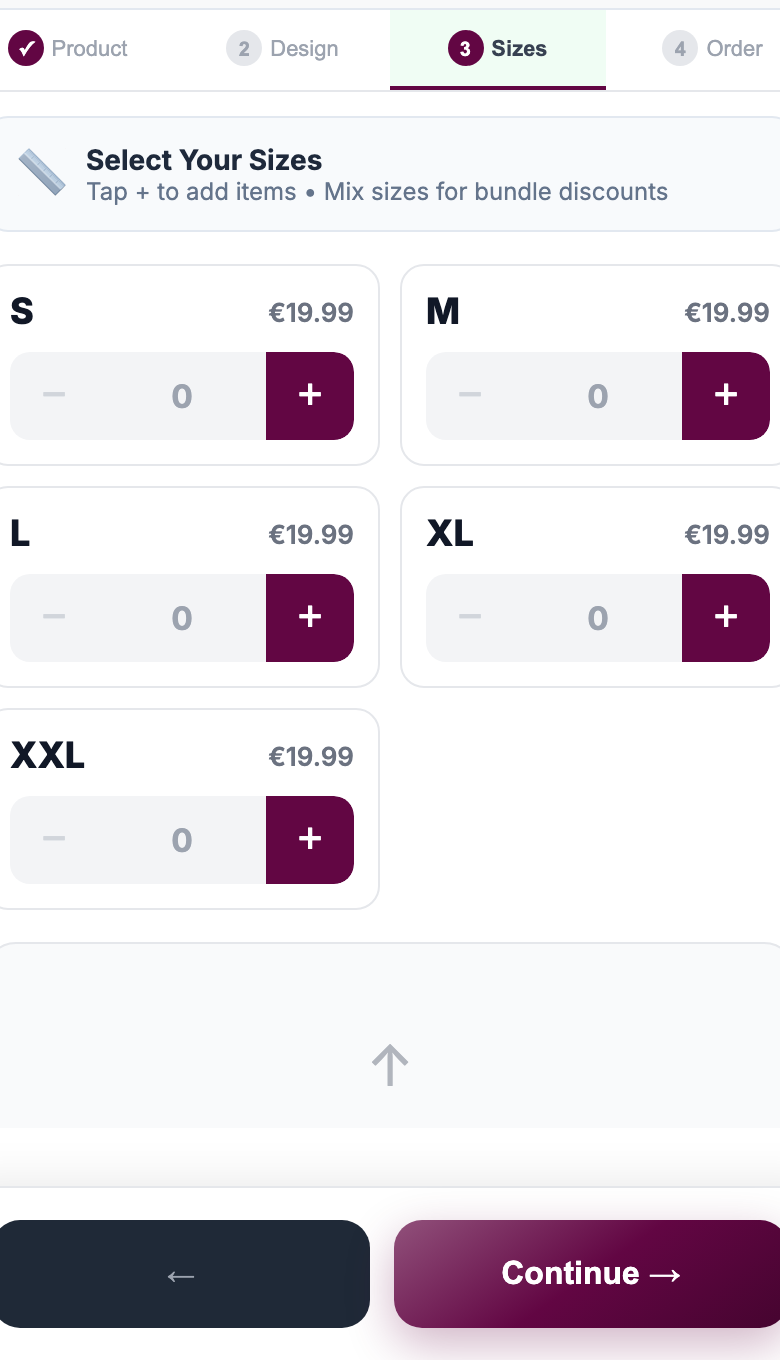
Step 3 Mobile flow

Mobile-friendly size, quantity, discount, and upsell flow

The size step is designed to help conversion, not just collect options. Quantity selection, discount thresholds, and the continue action stay obvious on a small screen.

SizesBundle discountsTouch-first controlsUpsell-ready flow
  • The same step logic works on mobile with touch-friendly size controls and a clearer continue path
  • Size and quantity choices can support bundle discounts directly in the buying flow, with thresholds shown to the shopper
  • Alternate products, related options, and upsell logic can be introduced as part of the order journey instead of as disconnected popups
Merchant control and print-ready production output
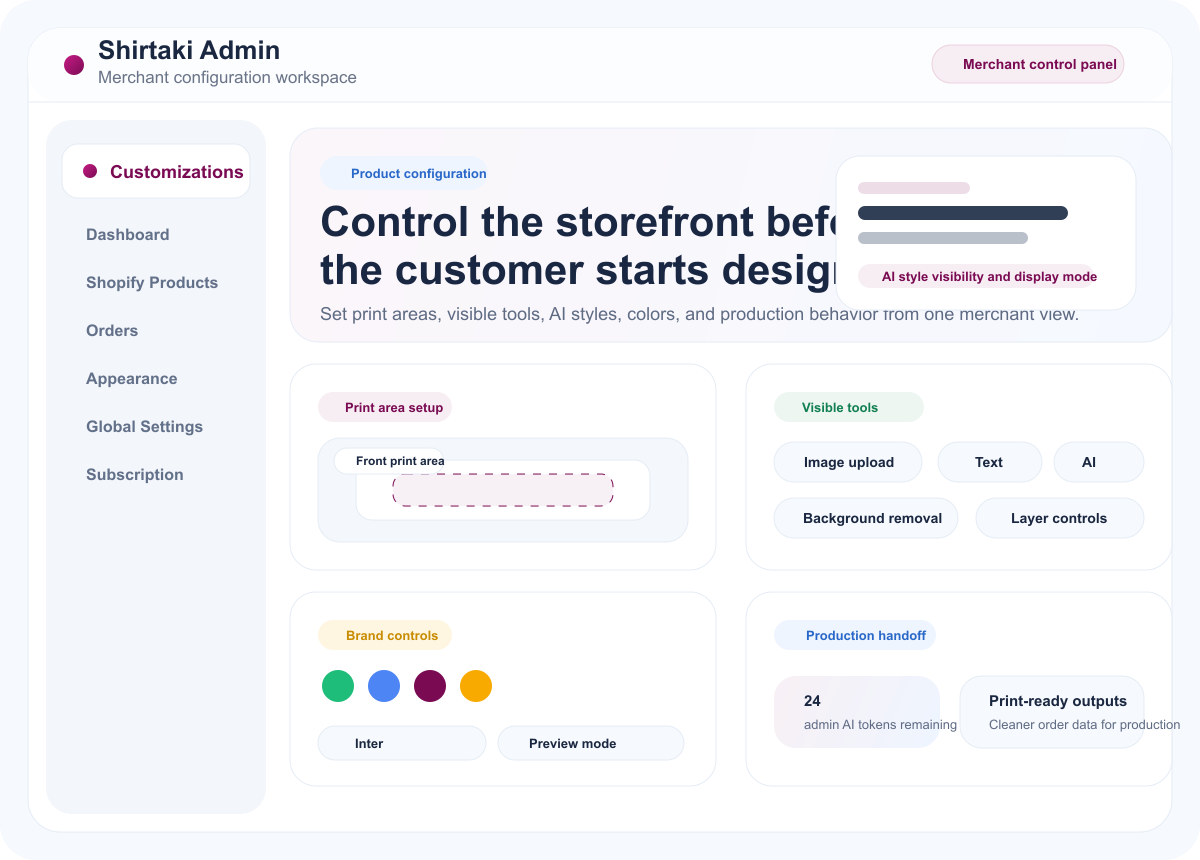
Step 4 Admin + output

Merchant control and print-ready production output

On the merchant side, the designer behavior stays configurable. Teams decide which tools are visible, which AI styles are enabled, and how the customer experience should behave before production starts.

Tool visibilityAI style controlsBrand colorsProduction-ready output
  • Merchants control visible tools, available AI styles, colors, brand behavior, and design logic from admin
  • After checkout, the order can move into print-ready output instead of manual recreation work
  • This keeps the shopper flow simple while giving production teams cleaner files and order data

Benefits

Main benefits

The product is positioned around revenue, launch speed, and production readiness.

Launch custom products faster

Add customization to existing Shopify products without rebuilding your stack.

Increase order value

Use variants, upgrades, and quantity logic to increase basket value.

Reduce manual design intervention

Use structured design steps and a cleaner storefront flow to reduce back-and-forth.

Support higher-margin product lines

Turn standard items into premium customizable products with a better UI.

Core functions

What customers and merchants can actually do

The interface is built around a guided customer flow and clear merchant controls, not an overloaded editor.

Upload and image placement

Customers can start with their own image and place it inside the merchant-defined print area instead of sending files later by email.

AI styles and cleanup

AI style actions and background removal help turn customer input into a cleaner visual starting point without exposing a complex editor.

Text options

Text can be added as part of the same design step so personalization stays inside one guided storefront experience.

Crop, zoom, and layers

Positioning tools help the shopper adjust artwork while the merchant keeps control over the boundaries of the design area.

Mobile-first buying flow

The product, design, sizes, and order steps remain easy to understand on mobile, not only on desktop.

Sizes and discount tiers

Quantity and bundle logic can be presented directly in the size step so shoppers understand the incentive before checkout.

Live Shopify product logic

The designer stays tied to the Shopify product, product status, and product choices instead of running as a disconnected mockup.

Print-ready handoff

Once the order is complete, the workflow is built to hand over cleaner production files and order data to the merchant or print team.

Use cases

Why merchants and print shops use it

Both sides of the workflow matter. The site should make that obvious.

Why merchants use it

  • Turn standard products into customizable offers without replacing Shopify
  • Make customization easy to understand on the product page
  • Create stronger margin opportunities with premium custom products

Why print shops and fulfillers care

  • Get better customer input before production starts
  • Spend less time fixing basic artwork issues manually
  • Prepare the workflow for more scalable production operations

Expansion

Supported product categories

The current positioning starts in merch and print, but the platform direction is broader.

Apparel and merchDrinkware and mugsStickers and labelsHome goodsKitchen productsBBQ and outdoor accessoriesEngraved productsFurniture and larger-format categories

Pricing

Simple plans for launch and growth

Start small, grow into AI-heavy flows, or move into enterprise requirements when you need more control.

Explore pricing structure

FAQ

Common questions before launch

Read the short version on Shopify fit, pricing, production flow, and support.

Read common questions

Live preview

See the real designer flow

Open the live Shirtaki designer to see the storefront style, step structure, and interaction model this website is now based on.

Open live designer

Next step

Make customization easier to buy and easier to produce.

Shirtaki Design Studio is built for merchants who want a polished designer experience and a cleaner production workflow behind it.